Over the last few months the SOC I work in has seen a huge increase in device code phishing compromises. It’s gone from something we’d read about occasionally to something we handle numerous times weekly, and the pattern is consistent enough that I thought it would be good to document in my blog. So here’s what we’re seeing, how the attack actually works, and what stops it.
Most phishing-awareness training drills one simple rule: check the link before you sign in. If the URL belongs to Microsoft, it should be safe, right? With device code phishing, that check doesn’t work. The link really does lead to Microsoft. The user signs in normally, completes MFA, and unknowingly gives the attacker the authentication tokens they need to access the account.
The Huntress 2026 Cyber Threat Report put OAuth abuse at 10.1% of identity threats, more than double the 4.8% of the year before. It’s spreading because it’s easy, it works despite MFA, and it needs no attacker infrastructure.
What device code authentication is
The flow exists for devices that can’t easily show a login prompt. Smart TVs, streaming boxes, Teams Rooms panels, command line tools. If you’ve signed into Netflix on a television, you’ve used it.
An application asks Microsoft for a device code.
Microsoft returns a short, temporary code.
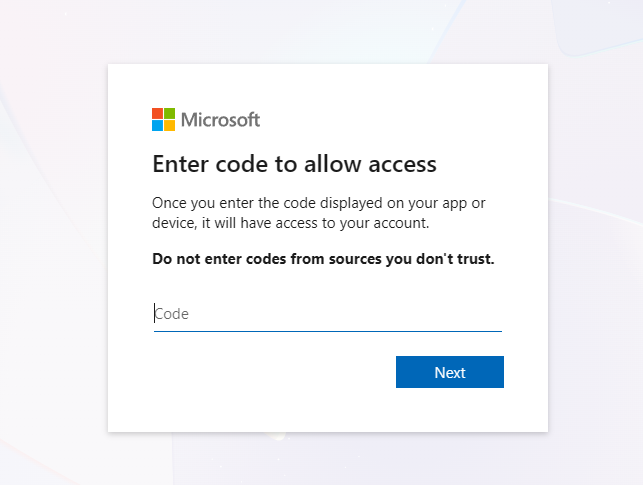
The user goes to a Microsoft login page on their phone or laptop.
The user enters the code and signs in, MFA included.
Microsoft issues tokens to the application that requested the code.
The genuine microsoft.com/devicelogin page.
How attackers use it
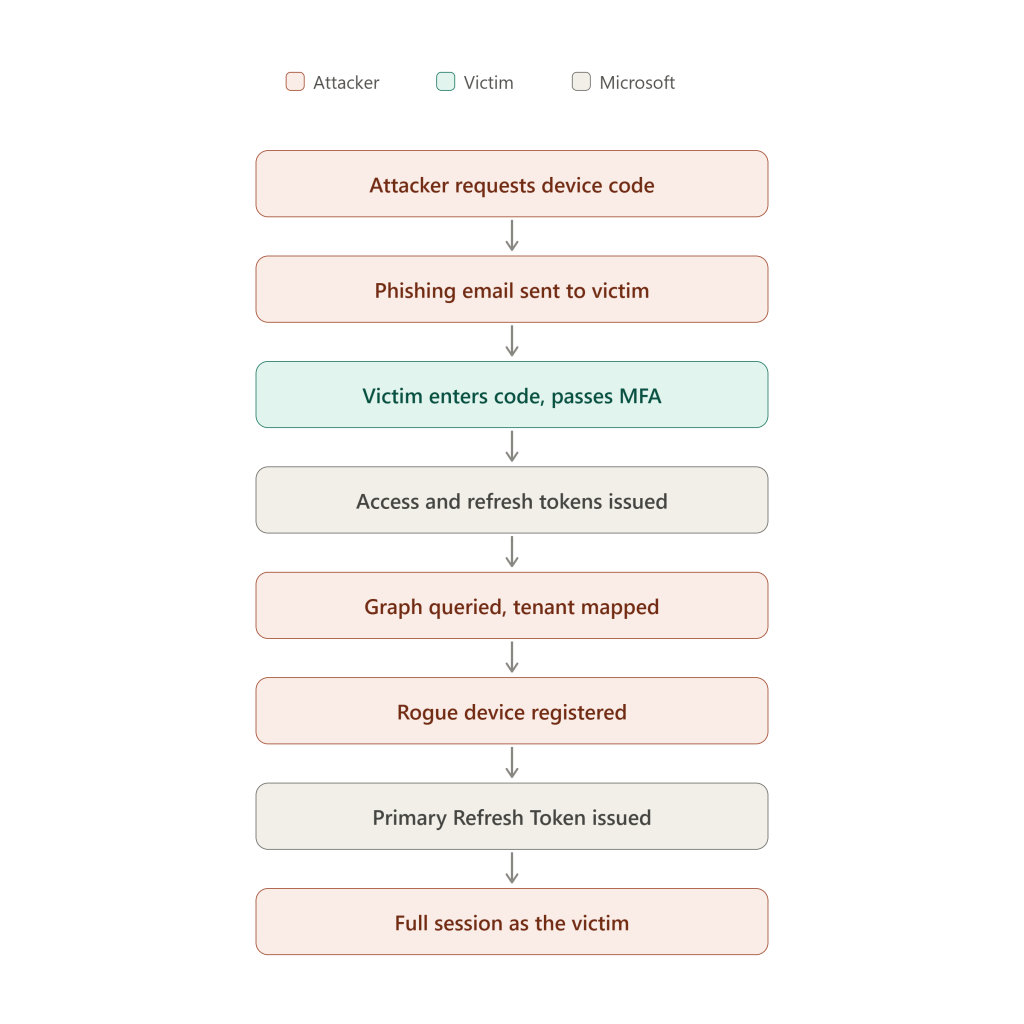
Attacker requests a device code from Microsoft.
Attacker sends that code to the victim with a plausible reason to enter it. Usually a Phishing email (sometimes over Teams or a phone call).
Victim visits the real Microsoft page, enters the provided code, completes login with MFA.
Microsoft issues tokens to the attacker’s waiting application.
That is the compromise, and it is complete in four steps. The attacker is holding valid tokens for the account and can use them against whatever those tokens permit. What follows is what an attacker commonly does next, not what they have to do. Plenty of these cases never involve a registered device at all, and an operator who only wants mail and directory access has no particular reason to bother:
Attacker queries Microsoft Graph and maps the tenant.
Attacker registers a device in Entra.
That device gets issued a Primary Refresh Token.
Attacker opens a fully authenticated session as the victim.
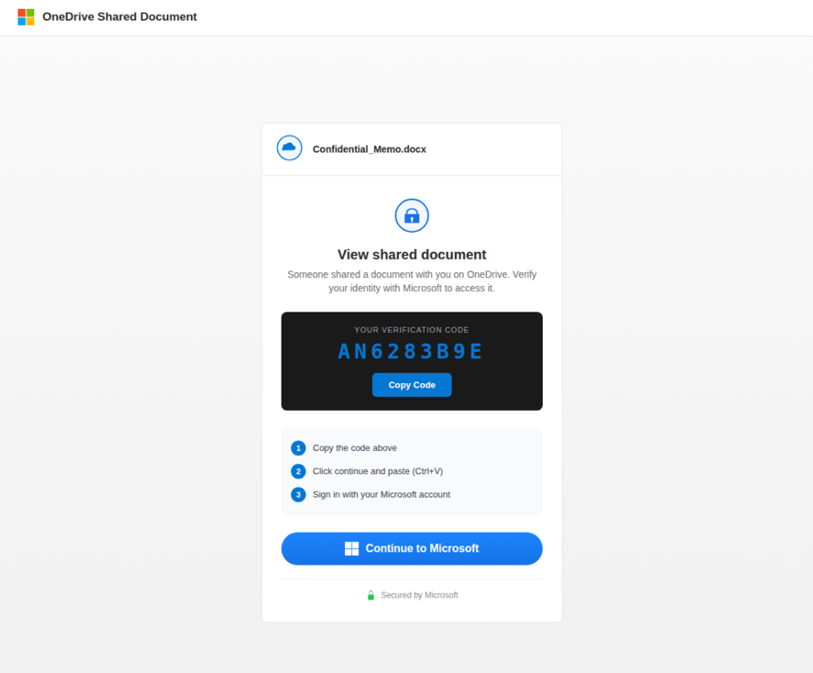
This is an example Phishing email as the victim sees it:
The codes expire quickly (about 15 minutes), so lures almost always carry urgency.
Tokens and their importance
Token
Lifetime
What it gets you
Access token
About an hour
Access to one service
Refresh token
Days to months
New access tokens without signing in again
Primary Refresh Token (PRT)
Long, bound to a registered device
Single sign-on across the Microsoft estate
The PRT is the one that matters the most. It’s tied to a device registered in your tenant and it gives seamless access across Outlook, SharePoint, OneDrive, Teams and the Azure portal. This is why you will often see a device registration event; it’s the most common pathway to a PRT, though an attacker who only wants mail and directory access may never bother. At that point the attacker isn’t borrowing a session, they’re operating as a trusted device in your tenancy that belongs to your user. This is why a password reset isn’t enough on its own: the tokens already issued carry on working until they are explicitly revoked.
How to prevent it?
Block the device code flow in Conditional Access. This is the real fix. Build a policy targeting the device code grant and block it for everyone who doesn’t need it, which in most places is nearly everyone.
Restrict device registration. Build a Conditional Access policy against the Register or join devices user action and require MFA, or an authentication strength, to complete it. Those are the only grant controls that action accepts. Requiring a compliant or hybrid-joined device is disabled there, which makes sense once you think about it: the device does not exist yet at the moment of registration. If you use this policy, set Entra ID > Devices > Device Settings > Require Multifactor Authentication to register or join devices to No, or it will not be enforced properly. This raises the bar on registration. It does not on its own put a PRT out of reach.
Turn on Continuous Access Evaluation.CAE lets Entra tell supported services to stop accepting a user’s tokens when certain critical events occur. For token theft, the important one is an administrator revoking the user’s refresh tokens. Microsoft describes CAE as near real time, although it can take up to 15 minutes to propagate. It isn’t a universal kill switch, though. Support is limited to certain services and client combinations, and there are additional limitations around location-based policies and guest accounts.
Audit your Conditional Access properly. Legacy exclusions, unscoped applications, break-glass accounts that drifted from what anyone documented. Misconfigured policies leave many organisations exposed with MFA enabled across the board.
Teach the specific behaviour. Dated phishing training won’t cover this. Add a device code scenario in your simulations if your platform supports one.
What to look for
If you can’t block the flow everywhere yet, these are the signals we can alert on:
Device code sign-ins outside the baseline. Filter sign-in logs on the device code authentication protocol. Legitimate use is rare, so almost anything new deserves a look. Pay attention to unfamiliar IPs, unexpected countries and hosting provider ASNs.
Device registrations shortly after a sign-in. A registration a short time after an odd sign-in is a fairly high fidelity indicator.
Device names that break your convention. Registration tooling usually leaves a default name behind, and attackers rarely bother changing it. Baseline what your own devices are called and alert on the outliers.
Authentication broker activity. Broker applications sit on the path to device registration and PRT issuance, and attackers lean on them heavily.
Graph reconnaissance. User and group enumeration, directory role queries, audit log access. Watch the volume. Nobody reads the directory at that speed by hand. (Table name MicrosoftGraphActivityLogs)
Hunting queries
Use the switch below to flip every query between Microsoft Sentinel and Defender XDR. It is not cosmetic: the two platforms genuinely do not share column names, and several of these hunts have no Defender equivalent at all because the underlying table only exists in Sentinel. Mixing the two up is the most common reason a copied query quietly returns nothing.
1. Find the lure. Start here if you are working backwards from a report, or sweeping for a campaign. The mail tables are the same on both platforms (only the time column changes) because these are Defender for Office 365 tables that stream into Sentinel. Note this is deliberately not scoped to one mailbox: device-code lures are sprayed, and the recipient list is your blast radius. Two things to read carefully in the output. Messages counts distinct messages while UrlMatches counts joined rows, because one message carrying several matching links produces several rows. And RecipientSample is capped at 50 for readability, so take RecipientCount as the real total.
// The lure itself: inbound mail carrying a link to the real Microsoft device-login
// page. Expect DeliveryAction = Delivered and a clean URL verdict: the link is
// genuine, so there is nothing for reputation filtering to catch.
EmailEvents
| where TimeGenerated > ago(30d)
| where EmailDirection == "Inbound"
| join kind=inner EmailUrlInfo on NetworkMessageId
| where Url contains "devicelogin" or Url contains "device-login"
| summarize Messages=dcount(NetworkMessageId), UrlMatches=count(),
            RecipientCount=dcount(RecipientEmailAddress),
            RecipientSample=make_set(RecipientEmailAddress, 50),
            Subjects=make_set(Subject, 8), Urls=make_set(Url, 8),
            FirstSeen=min(TimeGenerated), LastSeen=max(TimeGenerated)
        by SenderFromAddress, SenderFromDomain, SenderIPv4
| order by Messages desc
And who actually clicked it. A click is not proof of redemption, so confirm each one against the sign-in queries below.
// Who actually clicked. A click is not proof of redemption, so confirm each one
// against the device-code sign-in queries below.
UrlClickEvents
| where TimeGenerated > ago(30d)
| where Url contains "devicelogin" or Url contains "device-login"
| project TimeGenerated, AccountUpn, Url, ActionType, IsClickedThrough, IPAddress, NetworkMessageId
| order by TimeGenerated desc
// The lure itself: inbound mail carrying a link to the real Microsoft device-login
// page. Expect DeliveryAction = Delivered and a clean URL verdict: the link is
// genuine, so there is nothing for reputation filtering to catch.
EmailEvents
| where Timestamp > ago(30d)
| where EmailDirection == "Inbound"
| join kind=inner EmailUrlInfo on NetworkMessageId
| where Url contains "devicelogin" or Url contains "device-login"
| summarize Messages=dcount(NetworkMessageId), UrlMatches=count(),
            RecipientCount=dcount(RecipientEmailAddress),
            RecipientSample=make_set(RecipientEmailAddress, 50),
            Subjects=make_set(Subject, 8), Urls=make_set(Url, 8),
            FirstSeen=min(Timestamp), LastSeen=max(Timestamp)
        by SenderFromAddress, SenderFromDomain, SenderIPv4
| order by Messages desc
And who actually clicked it. A click is not proof of redemption, so confirm each one against the sign-in queries below.
// Who actually clicked. A click is not proof of redemption, so confirm each one
// against the device-code sign-in queries below.
UrlClickEvents
| where Timestamp > ago(30d)
| where Url contains "devicelogin" or Url contains "device-login"
| project Timestamp, AccountUpn, Url, ActionType, IsClickedThrough, IPAddress, NetworkMessageId
| order by Timestamp desc
2. Every device-code sign-in. Run this as a baseline. In most tenants the legitimate users are a short, boring list: Teams Rooms panels, some CLI tooling, a couple of service accounts. Once you know that list, anything outside it is worth a look.
// Every successful device-code sign-in. Legitimate use is rare and predictable,
// so baseline first and then alert on anything new.
SigninLogs
| where TimeGenerated > ago(30d)
| where AuthenticationProtocol =~ "deviceCode" or OriginalTransferMethod =~ "deviceCodeFlow"
| where ResultType == "0"
| summarize SignIns=count(), Apps=make_set(AppDisplayName,8), Resources=make_set(ResourceDisplayName,8),
            FirstSeen=min(TimeGenerated), LastSeen=max(TimeGenerated)
        by UserPrincipalName, IPAddress, Country=tostring(LocationDetails.countryOrRegion), ASN=AutonomousSystemNumber
| order by SignIns desc
Redemption is interactive, but the grants an attacker makes afterwards with the resulting refresh token are not. Run the same filter against AADNonInteractiveUserSignInLogs, which carries AuthenticationProtocol as well.
Not available in Defender advanced hunting. EntraIdSignInEvents has no AuthenticationProtocol or OriginalTransferMethod column, so you cannot filter on the device-code protocol at all. Baseline app and resource pairs instead and look for what does not belong.
// Defender has no device-code protocol column, so baseline app + resource pairs
// instead. A broker app or the Device Registration Service appearing for a user
// who has no reason to use them is the tell.
EntraIdSignInEvents
| where Timestamp > ago(30d)
| summarize SignIns=count(), Users=dcount(AccountUpn), IPs=make_set(IPAddress, 8),
            Endpoints=make_set(EndpointCall, 8),
            FirstSeen=min(Timestamp), LastSeen=max(Timestamp)
        by Application, ApplicationId, ResourceDisplayName
| order by SignIns desc
3. A device-code token used against the Device Registration Service. One of the highest-fidelity signals in the whole chain. It is the moment one approval becomes lasting access, and there is rarely a legitimate reason for it.
// One of the highest-fidelity signals: a device-code token being spent against the
// Device Registration Service. That is the step that turns one approval into
// lasting access, and it is almost never legitimate.
SigninLogs
| where TimeGenerated > ago(30d)
| where OriginalTransferMethod =~ "deviceCodeFlow"
| where ResourceDisplayName has "Device Registration"
| project TimeGenerated, UserPrincipalName, IPAddress, AppDisplayName, ResourceDisplayName,
          Country=tostring(LocationDetails.countryOrRegion), ResultType
| order by TimeGenerated asc
Defender cannot see the protocol, so pivot on the destination instead. IsManaged and IsCompliant describe the state of the device that signed in. They are not the outcome of policy evaluation, so do not read them on their own as proof that Conditional Access was or was not satisfied. Check them against ConditionalAccessStatus and the per-policy detail on the sign-in event if you need to know which policy applied and what it granted.
// Defender XDR has no AuthenticationProtocol column, so you cannot filter on the
// device-code protocol directly. Pivot on the destination instead: the broker app
// and the Device Registration Service are the tells.
EntraIdSignInEvents
| where Timestamp > ago(30d)
| where ResourceDisplayName has "Device Registration" or Application has "Authentication Broker"
| project Timestamp, AccountUpn, IPAddress, Country, City, Application, ApplicationId,
          ResourceDisplayName, EndpointCall, DeviceName, DeviceTrustType, IsManaged, IsCompliant, ErrorCode
| order by Timestamp desc
4. Sign-in followed by a device registration. Registrations on their own are noisy and plenty are legitimate. The pairing is not. This joins the two and shows the gap between them.
// Device-code sign-in followed by a device registration by the same user within
// 30 minutes. Registration alone is noisy; the pairing is not.
let lookback = 30d;
let window   = 30m;
let dc =
    SigninLogs
    | where TimeGenerated > ago(lookback)
    | where AuthenticationProtocol =~ "deviceCode" or OriginalTransferMethod =~ "deviceCodeFlow"
    | where ResultType == "0"
    | project SignInTime=TimeGenerated, UserPrincipalName, SignInIP=IPAddress, AppDisplayName;
let reg =
    AuditLogs
    | where TimeGenerated > ago(lookback)
    | where OperationName in ("Register device", "Add registered owner to device", "Add registered users to device")
    | extend UserPrincipalName = tostring(InitiatedBy.user.userPrincipalName),
             RegIP             = tostring(InitiatedBy.user.ipAddress),
             Device            = tostring(TargetResources[0].displayName)
    | project RegTime=TimeGenerated, UserPrincipalName, RegIP, Device, Result;
dc
| join kind=inner reg on UserPrincipalName
| where RegTime between (SignInTime .. (SignInTime + window))
| project SignInTime, RegTime, Delta = RegTime - SignInTime,
          UserPrincipalName, SignInIP, RegIP, AppDisplayName, Device, Result
| order by SignInTime desc
Not available in Defender advanced hunting. Entra directory audit events, including device registration, are not in the Defender schema at all. There is no AuditLogs table to join against. Use Sentinel for this one, or the Entra admin center audit log.
5. Directory reconnaissance through Graph. Enumeration of users, groups and roles is the first thing an attacker does with a working token. Volume is the signal as much as the actions.
// Directory reconnaissance through Graph. Volume matters as much as the actions:
// nobody reads a directory at this speed by hand. Tune the threshold to your tenant.
MicrosoftGraphActivityLogs
| where TimeGenerated > ago(30d)
| where RequestUri has_any ("users", "groups", "directoryRoles", "auditLogs", "servicePrincipals", "applications")
| summarize Requests=count(), Endpoints=dcount(RequestUri), Sample=make_set(RequestUri, 10),
            IPs=make_set(IPAddress, 8), Agents=make_set(UserAgent, 5),
            FirstSeen=min(TimeGenerated), LastSeen=max(TimeGenerated)
        by UserId, AppId, Hour=bin(TimeGenerated, 1h)
| where Requests > 200   // 200 within a single hour, not 200 spread over the month
| order by Requests desc
// Defender equivalent. Note the column names differ from Sentinel's table:
// IpAddress (lowercase p), ApplicationId, AccountObjectId.
GraphAPIAuditEvents
| where Timestamp > ago(30d)
| where RequestUri has_any ("users", "groups", "directoryRoles", "auditLogs", "servicePrincipals", "applications")
| summarize Requests=count(), Endpoints=dcount(RequestUri), Sample=make_set(RequestUri, 10),
            IPs=make_set(IpAddress, 8),
            FirstSeen=min(Timestamp), LastSeen=max(Timestamp)
        by AccountObjectId, ApplicationId, TargetWorkload, Hour=bin(Timestamp, 1h)
| where Requests > 200   // 200 within a single hour, not 200 spread over the month
| order by Requests desc
6. Device registrations that break your naming convention. Tooling that registers devices tends to leave a default name behind. Rather than chase one tool’s default, which changes between versions and which any operator can override, invert it and alert on anything that does not match the convention your own estate uses.
// Device registrations whose name doesn't match your naming standard. More durable
// than chasing one tool's default, which changes and which any operator can override.
AuditLogs
| where TimeGenerated > ago(30d)
| where OperationName in ("Register device", "Add registered owner to device")
| extend Device  = tostring(TargetResources[0].displayName),
         Actor   = tostring(InitiatedBy.user.userPrincipalName),
         ActorIP = tostring(InitiatedBy.user.ipAddress)
| where Device !startswith "CORP-"          // <-- replace with your convention
| project TimeGenerated, Actor, ActorIP, Device, Result
| order by TimeGenerated desc
Not available in Defender advanced hunting. Same reason as above: device registration is an Entra audit event, and Defender advanced hunting has no AuditLogs table. Sentinel or the Entra portal.
If you would rather not write these by hand, the BEC Checker on this site generates them and a wider account-compromise set, pre-filled with the account and time window, with the same platform switch. Everything runs in your browser.
One warning on indicators. You’ll see login.microsoftonline.com and microsoft.com/devicelogin listed as IOCs in various write-ups. They’re legitimate Microsoft URLs and alerting on them alone will bury your queue. What you’re actually looking for is an unsolicited message containing one of those URLs alongside a code the recipient never asked for.
If you’re responding to one
A password reset on its own is not containment. Revoking sessions is the step that invalidates the refresh tokens and PRTs already issued, but it does not reach the access tokens the attacker is already holding: those keep working until they expire, up to roughly an hour, unless CAE is in play and the service supports it.
Reset the password.
Revoke sessions explicitly, which invalidates the refresh tokens and PRTs issued before that point. With CAE enabled, supported services such as Exchange, SharePoint and Teams also stop honouring already-issued access tokens within minutes; without it, those access tokens run until they expire on their own.
List devices registered to the account and review anything that appeared around the incident window. Timing is a reason to investigate a registration, not proof that it is attacker-owned, so confirm before you remove.
Check mailbox rules, forwarding rules and delegated mailbox permissions.
Check for OAuth application consent grants added during the window.
Review Graph activity to work out what the attacker already enumerated.
Check Exchange, SharePoint and OneDrive for data access and exfiltration.
Assume the directory was enumerated before you noticed. Scope the investigation to what the attacker could have learned, not just what you can see them touching.
The takeaway
Device code phishing works by abusing trust rather than breaking the technology. The user authenticates normally. The URL is legitimate. The login page really is Microsoft’s.
There isn’t one setting that solves the problem, but there are a few things you can do. Block device code authentication where it isn’t needed, restrict who can register devices, enable Continuous Access Evaluation so revoked sessions are cut off faster, and monitor for the activity that gets through.