
A customer recently came to us confused about an alert another provider had already closed. They run a split-SOC arrangement, and that provider’s EDR had fired on “a process loaded a driver with known vulnerabilities.” It was triaged, marked a true positive, and resolved. No escalation, no context, no “here is what this means for you.” Just closed and gone.
The EDR did its job and flagged a risk, but no analyst named the driver, explained why it mattered, or told the customer what to do about it before closing the ticket. So it sat there as a True Positive resolved incident while the vulnerable driver remained on a live machine, waiting to be abused.
The customer then came to us asking for context. I pulled the logs the alert didn’t include, identified the actual driver (name, SHA256, and file path), and could finally answer the customer’s real question: what is this, and what do I do about it? It turned out to be a signed driver bundled with a remote-access product, carrying a known vulnerability that let a standard user escalate straight to SYSTEM. The remediation was simple: remove the software and its driver if it isn’t needed, or update it if it is.
This also raises a point about security providers: the analysts triaging these alerts need to be trained on this attack vector so they understand its significance rather than dismissing it.
What BYOVD and LOLDrivers actually are
BYOVD (Bring Your Own Vulnerable Driver) is a technique where instead of writing some advanced malware to gain kernel level access, an attacker brings along a legitimately signed driver that happens to contain a vulnerability. Windows trusts the signature and loads it, and the attacker has a supported path straight into the kernel, the one place most security controls cannot see.
Once a vulnerable driver is loaded, it can be abused to do things no user-mode process should ever be able to do:
- Read and write arbitrary kernel memory.
- Terminate protected processes, including EDR and AV sensors.
- Strip or disable the kernel callbacks that EDRs rely on to see activity.
- Bypass protections such as HVCI and Protected Process Light (PPL).
LOLDrivers (“Living Off The Land Drivers”) is the community project that catalogues these vulnerable drivers. If you have used LOLBAS or GTFOBins, it is the same idea applied to drivers, trusted but dangerous when abused.
It’s important to know that loading or installing a driver needs administrative rights in the first place, but abusing one that is already in place doesn’t require admin privileges. If a vulnerable driver ships with legitimate software that is already on the machine, a low-privileged user may be able to talk to it directly. Whether that actually works depends on the driver. The permissions on its device object decide who can open a handle to it, and the IOCTLs it exposes decide what you can do once you have one. Plenty of vulnerable drivers are only reachable by SYSTEM or an administrator. The one I use below is not. I wanted to see what it looked like from an EDR standpoint and how easy it is to abuse if such a vulnerable driver is already in place:
Proof of concept: killing an EDR as a standard user
Here I reproduced a BYOVD process termination attack against a protected EDR process in a VM. The goal is to kill Microsoft Defender for Endpoint’s sensor from a standard user account, using nothing but a signed driver. It’s worth noting that for this demo, Memory Integrity was off in this VM, and so was the Microsoft vulnerable driver blocklist. Memory Integrity depends on virtualisation-based security, which needs nested virtualisation that most VMs do not expose by default. The vulnerable driver blocklist is a code integrity policy that matches known-bad drivers by hash, and it does not depend on virtualisation at all, so it has to be accounted for on its own rather than lumped in with Memory Integrity. Both were off here, and that is part of why the driver loaded at all.
The driver I’m using here is BootRepair.sys, a legitimate Lenovo kernel driver that comes with Lenovo PC Manager and is signed by LENOVO (LOLDrivers Link, VirusTotal Link). It exposes a dangerous IOCTL interface capable of terminating any process. (An IOCTL is just a command a program sends to a driver to make it do something.)
To abuse it, I used PhantomKiller, a known, precompiled tool that sends BootRepair.sys the IOCTL to terminate a process ID of your choosing. Since this is a known bad binary, I overrode the warnings telling me to not download and run this executable.
Step 1: Installing the driver. On a real Lenovo endpoint, BootRepair.sys is just part of the installed software, so an attacker does not need to place it there. To reproduce that starting point in the lab, I registered and started it as a kernel service, which does require administrative rights:
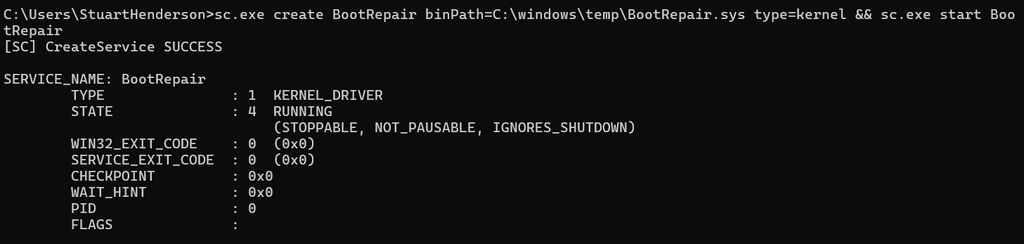
PowerShell confirms the service (and therefore the vulnerable driver) is loaded and running:

Step 2: identify the target process to kill. The process I want to kill is MsSense.exe, the core sensor for Microsoft Defender for Endpoint and the component that monitors and reports security telemetry on enterprise Windows systems. Here it is running as SYSTEM under PID 3460:

Step 3: Kill the process while running as a standard user. Now I drop to a standard user context, an account with no membership of the local Administrators group. net session returns “Access is denied,” confirming the process is not elevated. Here the account is genuinely a standard one, so there is no elevated token sitting behind it to fall back on. Then I point PhantomKiller at PID 3460, and the vulnerable driver happily terminates a SYSTEM-level protected process on my behalf:
![Command Prompt: net session returns System error 5, Access is denied, confirming an unelevated context, followed by PhantomKiller.exe 3460 reporting [+] killed 3460.](https://sudo-savvy.com/wp-content/uploads/2026/09/image-5.png)
Checking Task Manager again, MsSense.exe is gone. The EDR’s sensor has been killed by an unprivileged user:

A standard user has performed a kernel-level action and nullified the endpoint’s primary defence. We could go further and kill every component of Defender for Endpoint if we wanted to.
As I only killed MsSense.exe, the process eventually came back online and started reporting to Microsoft Defender XDR again. Telemetry resumed, but I did not try to establish whether anything from the gap was lost, and seeing it flow again is not the same as confirming nothing was missed. MsSense.exe automatically restarts because Microsoft Defender for Endpoint is designed to maintain continuous sensor operation and recover if the process is terminated.
Interestingly, while perusing the device timeline in Defender, I can only find the command used to kill the process. I see nothing on the driver performing this action on behalf of the user.
The reason comes down to what Defender records: process, file, registry and network activity, plus the fact that a driver loaded. It does not capture the private operations a signed driver performs through its own interface once it is running in the kernel.
A note on the test conditions. Tamper protection was enabled, so the kill still went through, because the termination came from the kernel through the signed driver, below where tamper protection can intervene. Another thing I relaxed was placing PhantomKiller.exe in a folder excluded from Defender antivirus so it would not be quarantined before it could run, and that hides the tool, not the driver or the kill. An endpoint that stops checking into EDR is worth chasing on its own, because a sensor that goes quiet may have been purposefully taken down rather than dropped offline due to inactivity.
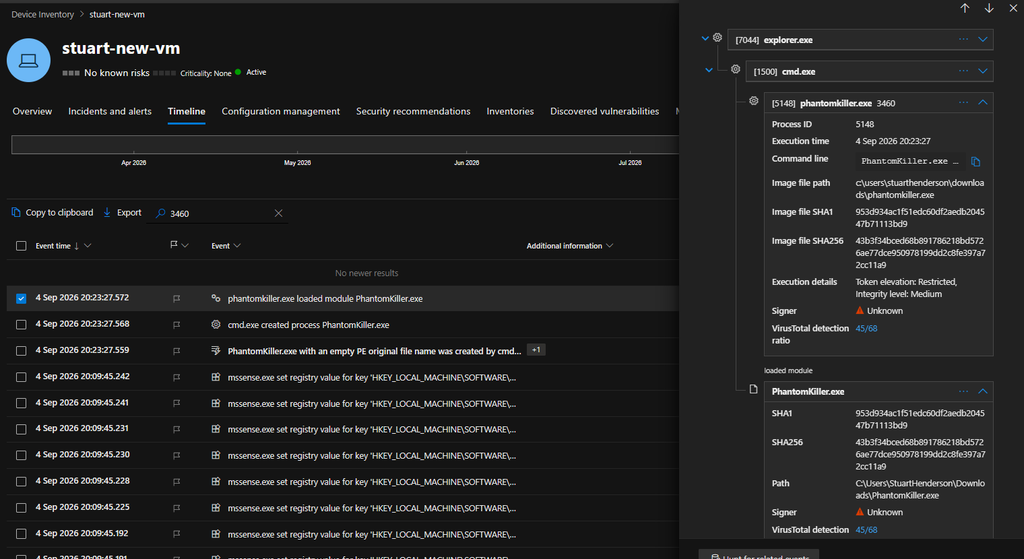
The gap is real, but it is worth stating precisely: in this test the device timeline showed the tool running, and I did not find an event that attributed the process termination to the driver.
Hunting for vulnerable drivers with KQL
LOLDrivers publishes its whole dataset, so you can hunt your own tenant for driver loads that match it:
let LOLDrivers = externaldata (Category:string, KnownVulnerableSamples:dynamic, Verified:string)
    [@"https://www.loldrivers.io/api/drivers.json"]
    with (format="multijson");
let VulnByHash =
    LOLDrivers
    | mv-expand KnownVulnerableSamples
    | extend DriverSHA256 = tolower(tostring(KnownVulnerableSamples.SHA256))
    | where isnotempty(DriverSHA256)
    | summarize Category = any(Category), Verified = any(Verified) by DriverSHA256;
DeviceEvents
| where ActionType == "DriverLoad"
| extend DriverSHA256 = tolower(SHA256)
| join kind=inner VulnByHash on DriverSHA256
| project Timestamp, DeviceName, FileName, FolderPath, DriverSHA256,
    Category, Verified, InitiatingProcessFileName, InitiatingProcessFolderPath
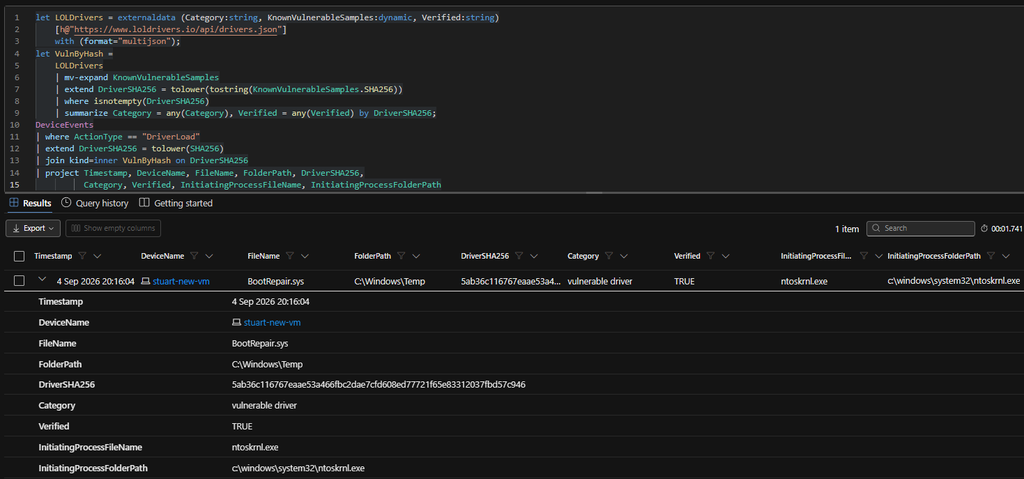
In my lab it lands squarely on the BootRepair.sys load from the demo, flagged as a vulnerable driver, verified, sitting in C:\Windows\Temp:
Treat the result as a hunt rather than an inventory. It returns driver loads that were recorded and whose hash appears in the LOLDrivers set, so it is bounded by your DeviceEvents retention, by whether the load was captured at all, and by the coverage of the dataset itself. A vulnerable driver sitting on disk that has not loaded inside the window will not appear, and neither will one LOLDrivers does not know about.
Preventing BYOVD attacks and final thoughts
There are a few things you can do to reduce BYOVD exposure:
- Turn on Memory Integrity (HVCI) and the Microsoft vulnerable driver blocklist. (As previously mentioned, Memory Integrity was off in this VM during my demo)
- Enforce Microsoft’s recommended driver block rules through App Control for Business
- Hunt continuously against the LOLDrivers dataset with the query above
- Patch or remove the vulnerable software
Vulnerable driver alerts and notifications shouldn’t be taken lightly by any organisation or the analysts investigating them. A vulnerable driver can provide an attacker with the level of access needed to bypass security controls, disable defensive tooling and gain a significant foothold on an endpoint.
interesting reads
- Huntress: They Got In Through SonicWall. Then They Tried to Kill – showcasing a live intrusion using a similar kernel-mode kill technique
- CrowdStrike: Scattered Spider Attempts to Avoid Detection with BYOVD – showcasing an actor abusing a vulnerable Intel driver against the Falcon sensor
- Intel 471: Hunting for RansomHub and Antivirus Killers – RansomHub’s EDRKillShifter
- Huntress: Threat Actor Defense Evasion: How Attackers Disable AV & EDR – broader overview calling BYOVD the “gold standard” for EDR impairment